
Leonardo - Convert Video for DaVinci Resolve Linux | Bytes Bread BBQ
Leonardo helps you convert video for DaVinci Resolve on Linux quickly and easily.
Leonardo gives Linux users a clean desktop interface for reliable video conversion, including fixes for TikTok 9:16 formatting and modern desktop compatibility.
As seen on LinuxLinks.com
Leonardo is a simple video converter for DaVinci Resolve on Linux
Leonardo helps Linux users convert video into formats that DaVinci Resolve can import more reliably. Instead of typing long FFmpeg commands by hand, you can use a simple graphical interface to choose a source file, select output settings, and convert your footage for editing. Leonardo is useful for creators who work on Linux and need a faster way to fix compatibility problems before bringing clips into DaVinci Resolve.
Best Way to Convert Video for DaVinci Resolve on Linux
SHA256 (Leonardo-10.0.13-Linux-x86_64.zip): c4bec3c1a96069165c675a8a94a9cda92530a17c7452707b0677901074b1ea29
SHA256 (LeonardoJAR.zip): fba7b1d38f21e68ed04ec6ff6c676eb9300daecbbfc1a8d9b8961cebc3b1b725
⚠️ Having Trouble Launching?
If the AppImage doesn’t start, your system may be missing FUSE.
Fix (quick):
Fedora:
sudo dnf install fuse fuse-libs
Ubuntu / Mint
sudo apt install libfuse2
Arch:
sudo pacman -S fuse2
👉 After installing, try launching again.
Download Leonardo Video Converter for Linux, Windows, and Mac
Leonardo helps you convert video for DaVinci Resolve on Linux quickly and easily.
Linux AppImage Version
👉 Download Leonardo AppImage (Linux)
No installation required — runs on most Linux distributions
This is the easiest way to use Leonardo on Linux without installing Java or additional dependencies.
You can download Leonardo and start using it immediately to convert video for DaVinci Resolve on Linux.
Leonardo is also available as a Java JAR file, making it compatible across multiple platforms.
Download Options:
👉 Download Leonardo Java JAR (Windows / Mac / Linux)
Requires Java 17 or newer installed on your system
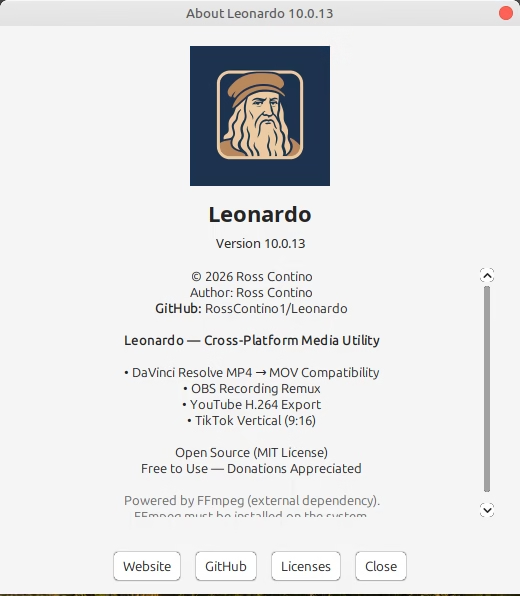
Leonardo gives you a simple, cross-platform way to convert video files into formats that work with DaVinci Resolve on Linux. Whether you are using Linux, Windows, or Mac, you can run Leonardo and quickly prepare your video files for editing.
🎥 Watch Leonardo in Action (2:01 Demo)
Convert Video for DaVinci Resolve on Linux
The free version of DaVinci Resolve on Linux does not support many common formats like MP4 due to missing codecs. While this is not an issue on Windows or Mac, it can be frustrating for Linux users trying to import video files.
Leonardo helps you convert video for DaVinci Resolve on Linux quickly and easily.
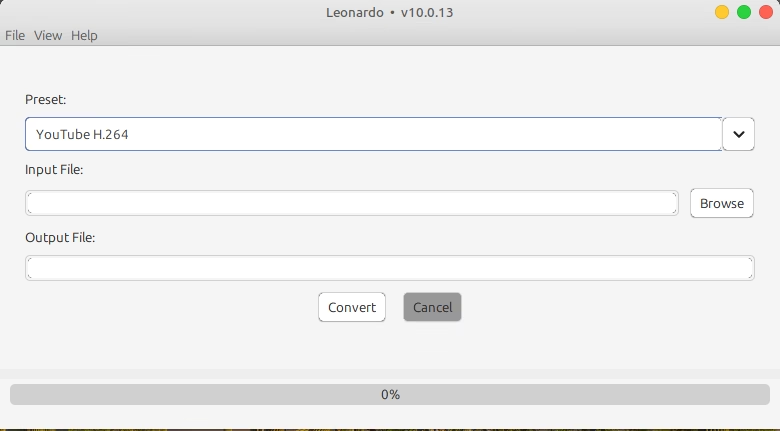
Leonardo solves this problem by making it easy to convert video for DaVinci Resolve on Linux. With a simple interface powered by FFmpeg, you can quickly convert MP4 files into MOV files that are compatible with the free Linux version of DaVinci Resolve.
Instead of manually writing FFmpeg commands, Leonardo lets you select your file, choose your output, and convert your video in just a few clicks.
Leonardo is a simple video converter for Linux users who need a fast and reliable way to prepare files for DaVinci Resolve.
Why Use Leonardo for DaVinci Resolve on Linux?
Leonardo is designed for Linux users who need to convert video for DaVinci Resolve on Linux quickly and reliably. If your video files will not import into DaVinci Resolve, Leonardo helps you convert them into compatible formats without dealing with complex FFmpeg commands.
You can use Leonardo to:
- Convert MP4 files into MOV format for DaVinci Resolve on Linux
- Fix video compatibility issues before editing
- Avoid manual FFmpeg command-line work
- Quickly prepare footage for video editing workflows
Leonardo makes it easy to take unsupported video files and turn them into formats that work smoothly in DaVinci Resolve on Linux.
How Leonardo Converts Video for DaVinci Resolve on Linux
Leonardo makes it simple to convert video for DaVinci Resolve on Linux in just a few steps. Instead of using complex FFmpeg commands, you can convert your video files through an easy graphical interface.
Step-by-step:
- Open Leonardo
- Select your source video file
- Choose your conversion/output settings
- Click convert to process the video
- Import the converted file into DaVinci Resolve on Linux
Leonardo handles the FFmpeg conversion process for you, making it easy to prepare video files that are compatible with DaVinci Resolve on Linux.
Who Should Use Leonardo for DaVinci Resolve on Linux
Leonardo is built for anyone who needs to convert video for DaVinci Resolve on Linux without dealing with complex FFmpeg commands.
Leonardo is ideal for:
- Linux users editing video in DaVinci Resolve
- Creators who need to convert video into compatible formats on Linux
- Users who want an easy FFmpeg GUI instead of using the terminal
- Anyone who does not want to memorize FFmpeg commands
- Video creators who need quick, repeatable conversion workflows for DaVinci Resolve on Linux
Leonardo is especially useful for Linux users who run into video import issues in DaVinci Resolve and need a fast, reliable way to fix them.
Leonardo Video Toolkit for Linux Creators
Leonardo is part of a growing toolkit of tools designed for Linux creators.
If you also need to create short, looping animations or memes, check out Domenico, a companion tool that converts videos into GIFs quickly and easily.
👉 Click Here To Download Domenico
Together, Leonardo and Domenico provide a simple workflow for Linux users who need to convert video for DaVinci Resolve on Linux and create shareable content.
System Requirements
Leonardo System Requirements
Leonardo is lightweight and designed to run on most systems.
- Operating System: Linux, Windows, or Mac
- Java: Java 17 or newer required
- Dependencies: FFmpeg (used internally by Leonardo)
Leonardo is especially useful on Linux systems where users need to convert video for DaVinci Resolve on Linux without dealing with complex command-line tools.
What's Included
When you download Leonardo, you get everything you need to start converting video files right away.
- Leonardo application (Java JAR or AppImage)
- Simple graphical interface for FFmpeg
- Fast video conversion workflows
- Cross-platform support (Linux, Windows, Mac)
Leonardo is designed to make it easy to convert video for DaVinci Resolve on Linux without needing to write FFmpeg commands manually.
Download Leonardo and Start Converting Video on Linux
Download Leonardo and start converting your video files for use in DaVinci Resolve on Linux in minutes.
👉 Download Leonardo AppImage (Linux)
👉 Download Leonardo Java JAR (Windows / Mac / Linux)
Leonardo provides a fast, simple way to convert video for DaVinci Resolve on Linux without needing to learn FFmpeg commands.
.
Built and maintained as an independent project. If it saves you time, it’s doing its job.